Asset Type Details
About
When creating a new or editing an existing Asset Type, the Asset Type Details
are shown.
Anatomy
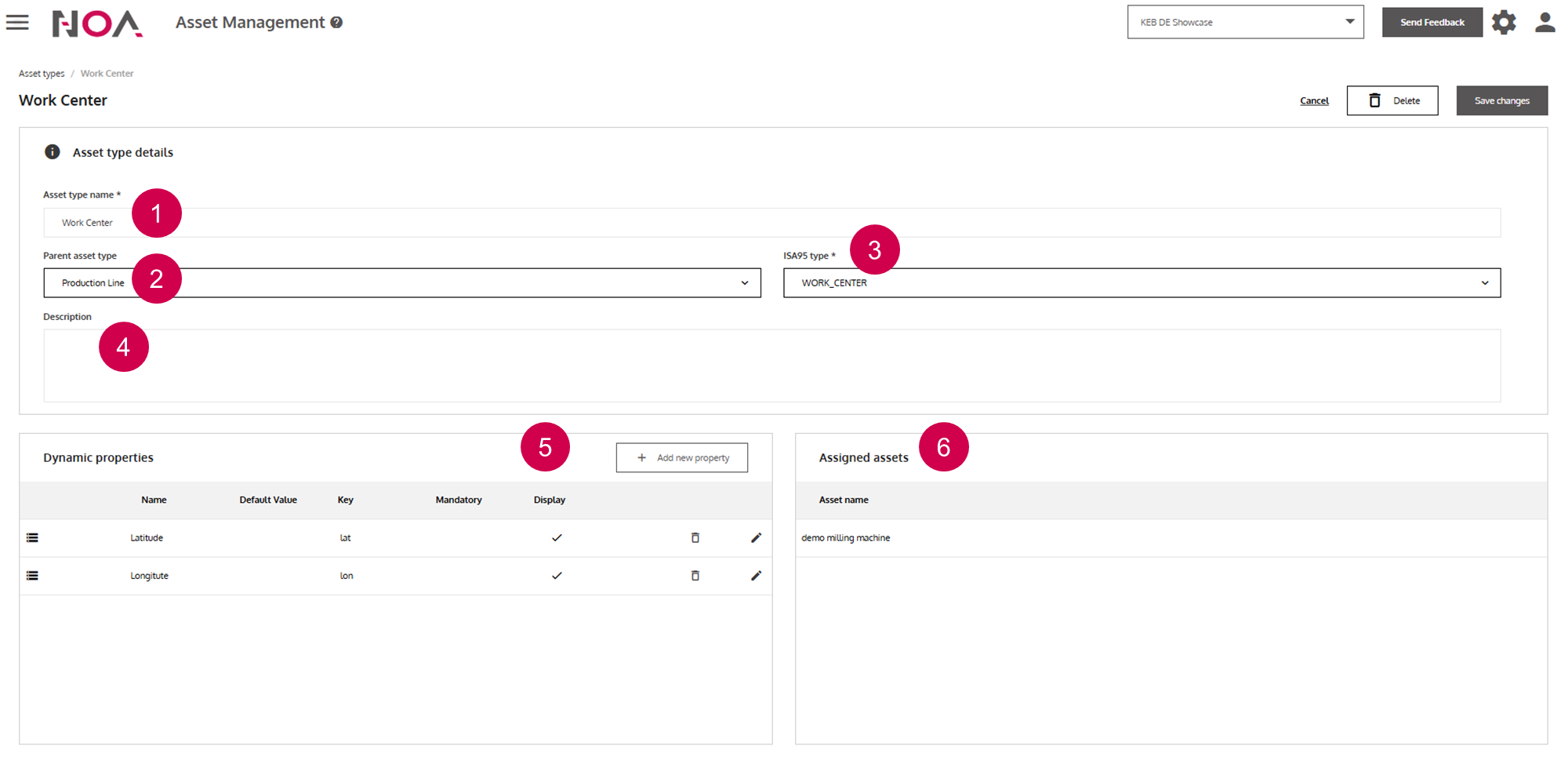
Display name
A child
Asset Typeinherits Dynamic Properties of the parentAsset TypeAsset Typeaccording to this standardEnter text freely
Dynamic properties(see below)Assetsthat are of thisAsset Type(only relevant when editing anAsset Type)
Dynamic properties: these are key value pairs that you can define for your Assets. They have the following attributes:
- Name: display name
- Default value: when no value is entered by the user
- Key: short form of the property
- Mandatory: when this is set, then the user has to input a value for this property when creating or editing an
Assetwith thisAsset Type - Display: when this is checked, then users are able to see this property
Dynamic properties are e.g. relevant for displaying the position of an Asset. Here, the properties Longitude and Latitude are used for that. Note: these properties are
relevant for the Asset Map feature in the App Builder. Define the properties as displayed in the image above for your Asset Types and Assets, so that you can use this feature.